



Picture this: your store’s WhatsApp is already well known to your customers. It is where questions about sizing, delivery, returns, and products come in. It is the number your shoppers saved, the one displayed on your Instagram profile, and the tool your team relies on daily to handle urgent requests. At the same time, your operation has scaled. You need to recover abandoned carts, confirm orders, trigger repurchase campaigns, and coordinate multiple agents — tasks that demand integration, scale, and the security of the Official WhatsApp API.
For a long time, it felt like you had to choose a side. Sticking with the WhatsApp Business App meant preserving agile human support, but with minimal automation and poor integration. Moving to the Cloud API unlocked templates, automations, and system integrations, but often disrupted how your team worked inside the app. For a growing e-commerce brand, changing phone numbers or splitting support and marketing campaigns across different identities created branding, context, and customer experience issues.
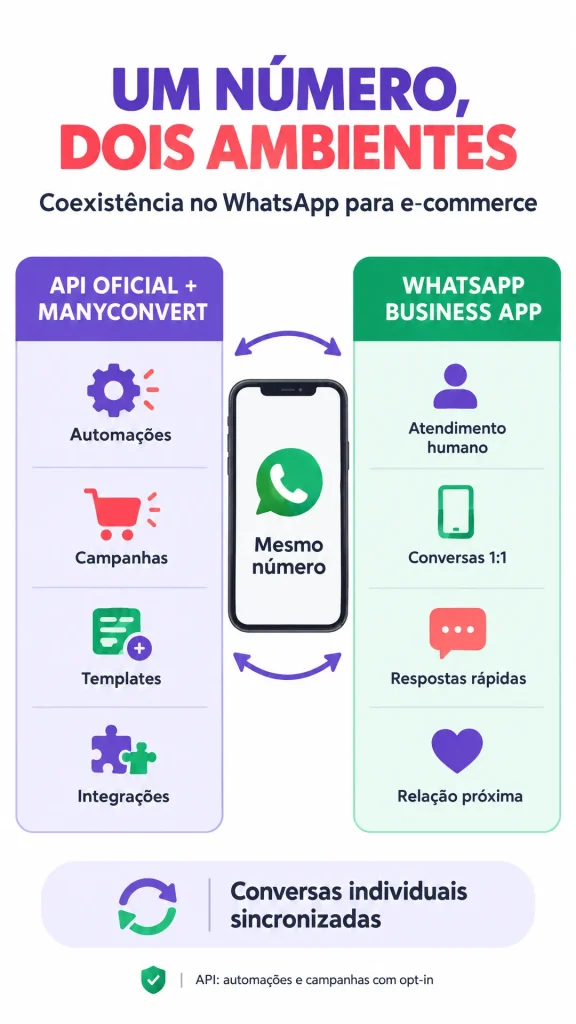
WhatsApp coexistence changes that dynamic. It is the official Meta feature that allows an active phone number on the WhatsApp Business App to operate simultaneously on the Cloud API. In practice, the same number handles automations and campaigns via the API while your team continues managing 1:1 conversations through the app. Messages from individual chats can be mirrored across both environments, ensuring customers maintain a single ongoing conversation with your brand.[1]
Coexistence is not a choice between automation and personal touch. It is an operational model where each environment performs the role it is best built for, provided the company complies with messaging, consent, and quality guidelines.
This guide explains how this model works, what changes in an online store’s day-to-day workflow, and which best practices keep a great scaling solution from turning into another chaotic channel.
What Is Official WhatsApp API Coexistence?
Coexistence — referred to by Meta as onboarding WhatsApp Business app users — connects a number already registered on the app to the WhatsApp Business Platform (Cloud API). Once activated, the store can send messages at scale via the API while continuing to use the mobile app for 1:1 conversations, without abandoning the number that built the relationship with its customers.[1]
The feature was designed for businesses already using the WhatsApp Business App daily that now need a technology layer to scale. Instead of treating the app and the API as competitors, coexistence turns both into components of the same operation: one for daily human interaction; the other for automated workflows, integrations, and approved campaigns.
During activation, the business authorizes the number’s connection, can consent to contact and history synchronization, and links the environment to an authorized partner platform. Meta’s documentation states that 1:1 chats from the most recent six months can be synced, and sent or received messages are mirrored between the API and the app. This preserves context and eliminates the feeling that the customer is “starting from scratch” when messaging the store.[1]
The most important takeaway for the customer experience is simple: they still see a single phone number. If they receive an automated order confirmation and then ask a question to an agent on the app, the conversation stays within the same chat thread. To the customer, there is no “system switch”; there is simply a brand responding quickly and with full context.
One Number, Two Environments: Who Does What?
The greatest advantage of coexistence becomes clear when the e-commerce defines the role of each environment before activating the feature. The API does not replace human support. It absorbs repetitive, transactional, scalable, or data-dependent tasks. The app preserves autonomy for 1:1 relationships, exceptions, and interactions that benefit from a personal touch.
| E-commerce need | Best environment | Why |
|---|---|---|
| Order confirmation, payment, tracking, and delivery updates | Official API | Automates transactional notifications using templates and direct integrations with the e-commerce platform. |
| Abandoned cart recovery | Official API | Enables triggering approved workflows, measuring performance, and scaling safely. |
| Repurchase campaigns, new arrivals, and promotional offers for opted-in contacts | Official API | Centralizes segmentation, message templates, and campaign analytics. |
| Specific product inquiries, complex return requests, or VIP customer care | WhatsApp Business App | Provides speed and flexibility for agents to resolve 1:1 conversations. |
| Conversations starting from automation and evolving into sales negotiations | App or connected platform | Shared conversation history lets the team pick the most suitable channel for the context. |
Think of an apparel brand. The API can confirm an order, provide tracking info, and remind an opted-in shopper about items left in their cart. When she replies asking if a garment runs small, a stylist can open the WhatsApp Business App and reply naturally, without asking for an order ID or rebuilding conversation context. The win is not just operational: it eliminates friction between automation and human care.
For marketing agencies, this separation is equally strategic. The agency sets up templates, automations, and campaigns inside an official platform, leaving the store’s in-house team to handle conversations requiring deep product knowledge or commercial decisions. As a result, automation does not compete with the sales rep; it delivers a warmer, higher-context lead directly into their hands.
Do ManyConvert Messages Show Up in the App? Does Replying via the App Incur Charges?
Yes, messages sent via the API through a platform like ManyConvert appear automatically inside the WhatsApp Business App. Conversely, messages sent from the app are relayed back to the integration via message echoes, enabling the platform to keep the conversation history in sync.[1] [2]
This addresses a very common merchant question: following a cart recovery automation or order confirmation, an agent can see the conversation on their phone and reply directly through the app. Messages sent from the WhatsApp Business App remain free; messages sent via the Cloud API are billed according to API pricing.[1] This distinction is especially relevant given Meta’s 2026 pricing updates, as service and utility conversation charges apply to messages sent via the API, not to direct app replies.[3]
However, there is a technical detail that must be included in your support playbook: an outbound message sent via the app does not open, renew, or extend the API’s 24-hour customer service window. The window opens or renews only when the customer sends a message post-onboarding. While the agent’s response in the app is mirrored on the platform, it is an echo message and should not be treated as an inbound trigger for automations.[1]
In other words, agents can leverage the context of a conversation started by a campaign or automation to reply via the app, but they should not expect that reply to extend the API’s free-form messaging window. Once the API window closes, any new outreach initiated by the platform requires an approved template, adhering to WhatsApp Business Platform rules.[3] [4]
Four E-commerce Customer Journeys That Work Better with Coexistence
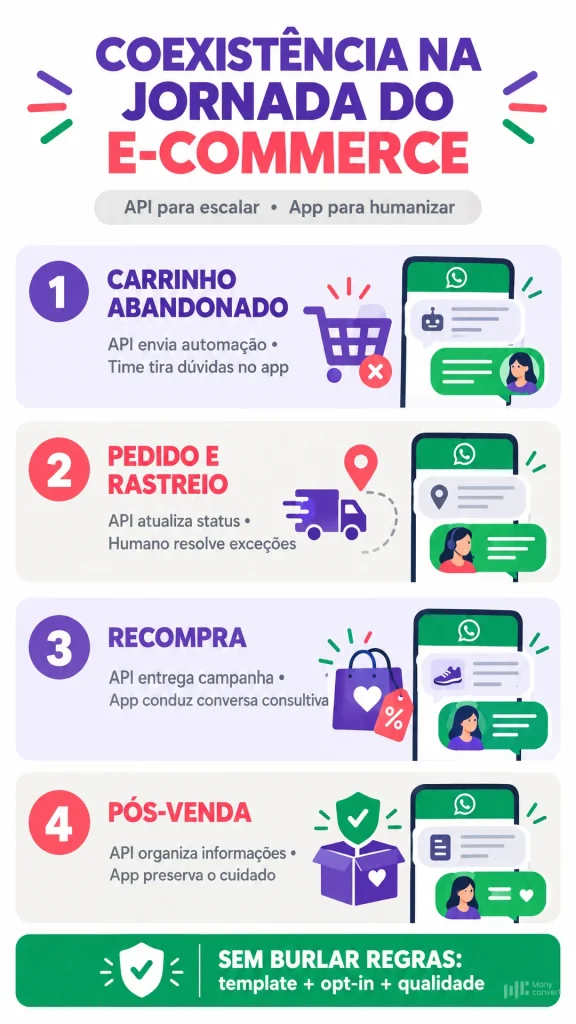
Coexistence is valuable because it eliminates the tension between “serving now” and “operating at scale.” Below are four customer journeys that turn this capability into measurable business outcomes.
1. Cart Recovery with Timely Human Handoff
ManyConvert can trigger an abandoned cart message using an approved marketing template targeted to an opted-in audience. If the shopper replies with a specific objection — such as shipping time to their zip code, size availability, or exchange policies — the team can step into the conversation right inside the app, where they already work quickly. Automation nails the timing; human care restores buyer confidence.
2. Post-Purchase Updates That Eliminate Repetitive Tickets
Payment, fulfillment, dispatch, and tracking updates are ideal for the API because they are driven by order data and require no manual input. When a delivery is delayed or a customer requests an exception, the support team replies via the app with full context. Instead of searching across disjointed systems, agents work directly from a chat already populated by automation.
3. Repurchase via Responsible Broadcasts
Restock alerts, new collection drops, and win-back campaigns can be executed through the API with robust segmentation, approved templates, and analytics. Meta itself requires businesses to obtain explicit opt-in before sending messages, clearly stating that customers are subscribing to updates from that brand; it also advises providing easy opt-outs and monitoring quality ratings.[5] This makes coexistence a far safer alternative to ad-hoc broadcast lists: the goal is sending fewer messages, but to the right audience with clear expectations.
4. Exception Handling Without Operational Bottlenecks
Not every interaction needs to turn into a formal support ticket. A delayed supplier, an incorrect size selection, or an urgent gift order: scenarios like these require human judgment. With coexistence, your team does not have to choose between “logging into a dashboard” or “replying on the phone” while the customer waits. They use the app to resolve the issue swiftly, knowing the conversation remains visible in the connected environment. For marketing agencies, this also mitigates the risk of building overly rigid automations for issues that should naturally escalate to the brand’s store team.
What Coexistence Is Not: Rules, Limitations, and Best Practices to Protect Your Number
Coexistence expands your capabilities, but it is not a workaround to bypass message templates, opt-in rules, or platform policies. This is the model’s most crucial boundary. Sending repetitive, manual, or unsolicited messages via the app can lead to user blocks, spam reports, and phone number quality downgrades — compromising the very number powering your API automations. WhatsApp policy requires businesses to possess the customer’s phone number, secure explicit opt-in for future communications, and immediately honor opt-out requests.[4] [5]
An agent initiating a relevant 1:1 conversation with an existing customer is fundamentally different from using the mobile app for mass messaging. For high-volume automations, campaigns, and notifications, the only compliant path remains the Official API, backed by pre-approved templates and explicit consent. This diligence is not bureaucracy: it safeguards your most valuable operational asset, your ability to reach customers who already trust your brand.
Technical limits also apply. Meta caps throughput at 20 messages per second for phone numbers operating simultaneously across the app and the Cloud API.[1] For most e-commerce businesses, this capacity is plenty; however, high-volume operations running flash sales or Black Friday campaigns must factor this into message queueing and scheduling. Additionally, coexistence does not sync group chats with the API, and certain app features are altered: disappearing messages, view-once media, and live location sharing are not supported by the Cloud API; furthermore, broadcast lists cannot be created after onboarding.[1]
Another operational consideration is app maintenance. Following onboarding, linked companion devices must be reconnected, and the business must keep its WhatsApp Business App active. Tech partners recommend opening the app periodically to prevent inactivity status, though specific eligibility and support criteria should be verified with your chosen solution provider before deployment.[2]
Implementation Checklist for E-commerce Brands and Agencies
Before enabling coexistence, run a straightforward assessment: which messages will be automated, which conversations require human intervention, and who owns each stage? Rollout should prioritize highly predictable journeys — order confirmations, shipping updates, and abandoned cart recovery — before expanding into broader marketing broadcasts.
| Key decision question | Recommended action |
|---|---|
| Is the number actively used on the WhatsApp Business App? | Verify eligibility and initiate onboarding through an official partner. |
| Do you have documented opt-in for your subscriber list? | Segment opted-in contacts and implement transparent unsubscribe flows. |
| What will be sent via the API? | Prioritize utility templates, order-based automations, and permission-based marketing. |
| When should a human agent step in? | Define escalation rules: complex inquiries, returns, price negotiations, urgent issues, or VIP buyers. |
| How will performance and quality be measured? | Track delivery rates, response rates, conversions, opt-out requests, and negative feedback. |
The goal is not to run two competing support operations. It is to architect a cohesive journey where the customer gets automated speed when it adds value and dedicated human attention when it makes the difference. For agencies, this roadmap also clarifies scope: the agency manages messaging strategy, workflows, and performance metrics, while the merchant retains ownership over product expertise and direct customer relationships.
ManyConvert: Official Automation and Human Support on the Same Number
Coexistence provides a practical path for e-commerce brands that refuse to compromise between scale and intimacy. With ManyConvert plans featuring coexistence, your store delivers WhatsApp automations and marketing campaigns backed by the Official API, while continuing to send and receive messages normally inside the WhatsApp Business App for 1:1 customer interactions.
In practice, ManyConvert empowers you to orchestrate broadcast campaigns, abandoned cart recovery, order notifications, and repurchase strategies directly within Meta’s official framework, while your team retains the freedom to jump into the app whenever a conversation calls for human connection. All on the exact same number, fully compliant with template requirements, opt-in rules, and platform policies.
Looking to automate sales without making your customer service feel impersonal? Talk to a ManyConvert specialist and discover coexistence plans built for your e-commerce.